Exercise Solutions
Exercise 1
From Exercise 1.
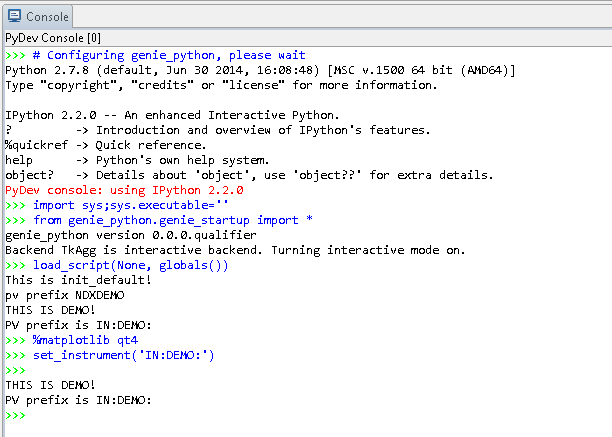
Opening a scripting window should be straightforward if IBEX is installed correctly. Once you’ve opened the scripting perspective, check for the following
Ideally the instrument will appear as
SETUPThe output when the scripting window opens should look a bit like this:
To print the message, enter something like
print "Hello, World!and press returnThe square of the integers between 1 and 10 can be output with the code below. A blank line will indicate to the scripting window that you’ve finished writing the loop and it can go ahead and be executed.:
for i in range(1,11):
    print i*i
Exercise 2
From Exercise 2
Use
g.change_title("Exercise 2")to change the titleThe following code will start the run, wait, and then pause:
g.begin()
g.waitfor_uamps(1)
g.pause()
This code sets the value, run control, and limits on “MY_BLOCK”. Your code may look slightly different depending how you’ve chosen to pass in the arguments:
g.cset("MY_BLOCK", 5, lowlimit=1, highlimit=10, runcontrol=True)
The following resumes the run:
g.resume()
This code will set the block value and check the subsequent state:
# Can use either way of specifying cset for a single block
g.cset(MY_BLOCK=20)

# Can verify in any sensible way, so long as we're getting g.get_runstate()
if g.get_runstate()=="WAITING":
    print "The instrument is waiting"
else:
    print "The instrument is not waiting"
The following code will scan the block from its original value down to 4. It assumes the initial value is greater than 4:
for i in range(int(g.cget("MY_BLOCK")['value']), 4, -1):
    g.cset(MY_BLOCK=i)
    g.waitfor_time(seconds=1)
This function will end the run:
g.end()
Exercise 3
From Exercise 3a.
(a) After creating the files, you should have one new file in
C:\scriptsand another inC:\Instrument\Settings\config\[Instrument name]\Python\inst(b) The function in
set_up_instrument.pyshould look something like this:- def set_up_instrument():
g.change_title(“My experiment”) g.change_user(“Adrian”)
(b) The function in
run_my_experiment.pyshould look something like this:
def get_uamps_run():
    g.begin()
    # Assume this doesn't change
    period = g.get_period()
    for i in range(10):
        print "Total current after {0}s: {1}.format(i+1, g.get_uamps(period))
        g.waitfor_time(seconds=1)
    g.end()
(c) This will load the user script:
g.load_script("run_my_experiment.py")(d) This will run the instrument script:
inst.set_up_instrument()(e) This will run the function from the user script
get_uamps_run()
Exercise 4
From Exercise 4.
You should have created a Python file in
C:\Instrument\Settings\config\[Machine name]\Python\instthat contains something like the following:
from genie_python import genie as g, BLOCK_NAMES as b

def ramp(block, target):
    try:
        initial = g.cget(block)['value']
    except:
        print "Problem getting value for block {0}. Make sure it exists".format(block)
    else:
        g.change_title("Ramping {0} from {1} to {2}".format(block, initial, target))
        g.begin()

        current = initial
        small = 0.0001
        while abs(current-target) > small:
            current = min(target, current + 1) if initial < target else max(target, current -1)
            g.cset(block, current)
    finally:
        g.end()
Once you add the line to output the current title, the top of your file should look like this:
print g.get_title()
def ramp(block, target):
    ...
This user-defined function will ramp the two blocks using the instrument function:
def ramp_two_blocks():
    for block, target in [("MY_BLOCK", 10), ("MY_OTHER_BLOCK", -10)]:
        inst.ramp(block, target)
To load the user script, assuming the file is called “ramp_blocks.py”, run the following from the scripting perspective:
g.load_script("C:\scripts\ramp_blocks.py")
ramp_two_blocks()
You should have seen the current title printed during the initialisation of the scripting window